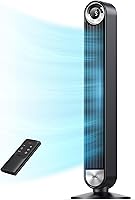
Why Is My Tower Fan Not Oscillating?
A tower fan that is not oscillating often has oscillation switched off or a control that needs attention. Check the setting, remote, and stable base with the fan unplugged before deciding whether to seek service or replace it.
On this page (9 sections)
- Why is my tower fan not oscillating?
- How do I check the oscillation setting and remote?
- Could the base or placement stop a tower fan from oscillating?
- Can dust make a tower fan stop oscillating?
- Why is my Lasko tower fan not oscillating?
- When should I stop using the fan and seek repair?
- Which replacement fan suits your room and routine?
- How do you set up and care for a replacement tower fan?
- What should I do if my tower fan still will not oscillate?
A tower fan not oscillating may simply have the feature switched off, or its remote, control, or base may need attention. Turn the fan off and unplug it before checking its controls, assembly, and any surfaces you can safely reach.
Start with the oscillation button on the fan or remote. If the setting is on and the base is stable, consult the manual for your model; don't force the fan to turn or open its housing.
Why is my tower fan not oscillating?
A tower fan may stop turning side to side because oscillation is off, its control isn't responding, or its base is unstable. Check the setting and remote first, then inspect the base with the fan unplugged.
Press the oscillation control on the fan itself, if it has one. If you use a remote, point it at the fan and try fresh batteries if other buttons also fail to respond.
Some fans keep their last setting after being switched off, while others may restart with oscillation disabled. Follow the instructions for your model rather than expecting every fan to resume the same way.
A fan that blows while stationary may still provide airflow in one direction. That doesn't explain why its movement stopped, so look for a control issue or other sign of a problem before relying on it.
How do I check the oscillation setting and remote?
Check the fan's oscillation button or control setting before cleaning or seeking repair. A fan can run at its selected speed even when its side-to-side movement is turned off.
If the remote's other buttons work but oscillation does not, try the control panel on the fan. If neither control responds, switch the fan off, unplug it, wait briefly, then reconnect it and try again, following the manual.
Fresh remote batteries can rule out a simple power problem. For example, the Lasko T42951 remote controls power, speed, oscillation, timer, and nighttime setting, so you can compare its control options with what you need.
The DREO has 12 speed settings and lets you choose a 30-, 60-, 90-, or 120-degree sweep. If you're comparing its controls with another model, see our Dreo vs Lasko tower fan comparison.
Could the base or placement stop a tower fan from oscillating?
A tower fan needs a stable, correctly assembled base to stand securely as it moves. A loose base or uneven floor can make it wobble and may interfere with smooth movement.
Turn the fan off and unplug it before checking its base. If the model needs assembly, follow its instructions and tighten only the parts the manual identifies.
Set the fan on a level, firm surface with room around it. Keep it clear of furniture, curtains, and other objects that could block its sweep.
Don't tilt or hold the fan while it tries to oscillate. If it wobbles or makes a new scraping sound, stop using it and consult the manual.
Can dust make a tower fan stop oscillating?
Dust on accessible surfaces and air openings can affect airflow, but it may not explain a fan that no longer turns side to side. Unplug the fan before cleaning and follow the instructions for your model.
Use a soft cloth or vacuum attachment only where the manual allows. Don't spray liquid into the fan, insert tools through its vents, or remove the housing to reach internal parts.
For steps that avoid opening the housing, read our guide to cleaning a tower fan without disassembly. Regular surface cleaning can limit dust buildup, but it won't repair a faulty control or movement mechanism.
Why is my Lasko tower fan not oscillating?
If a Lasko tower fan isn't oscillating, first check that oscillation is selected on its remote or control panel. Confirm that it stands upright on a base assembled as the manual describes.
The Lasko T42951 remote controls oscillation along with power, speed, timer, and nighttime setting. Its 60-degree sweep is a focused option for someone who doesn't need a very wide arc.
The Lasko has three speeds and a 7.5-hour timer. The Honeywell QuietSet HYF295 offers touch controls, a remote, oscillation, and eight power levels.
If the control responds but the fan does not move, or you hear grinding or clicking, stop using it and check the model's manual or contact Lasko support. Don't open the fan to inspect its motor or gears.
When should I stop using the fan and seek repair?
Stop using a tower fan if it has a damaged cord, burning smell, unusual noise, or an unstable base. Switch it off and unplug it, then follow the maker's instructions for repair or support.
If the fan runs but doesn't oscillate, it may still blow air in one direction. Stop using it if it wobbles, smells hot, or sounds different from usual, since those signs call for more than a setting adjustment.
Don't force the tower to turn by hand. Avoid removing covers or trying to repair wiring or gears unless the manual specifically instructs you to do so.
Which replacement fan suits your room and routine?
Choose a replacement based on how widely you want it to sweep, how you want to control it, and where you plan to use it. A wider range gives you more choice over the area the fan covers, while simpler controls may suit someone who wants fewer settings.
The DREO is the best fit here if you want a choice of sweep angles, from 30 to 120 degrees, plus remote and touch controls. Its 12 speeds and app, Alexa, and Google Assistant controls suit someone who wants several ways to adjust a fan; skip it if you prefer a simpler setup without smart features.
The Lasko T42951 suits someone who wants a remote, three speeds, nighttime setting, and a 7.5-hour timer. Its 60-degree sweep is narrower than the DREO's widest option, so choose another model if broad, adjustable coverage is your priority.
The Honeywell QuietSet HYF295 is a strong match if you want eight power levels, touch controls, and a remote. Its QuietSet controls and dimmable sleep mode suit bedrooms or dorm rooms; skip it if you need a published sweep angle to plan coverage, since that detail isn't specified here.
Before buying, decide where the fan will stand, how much room its sweep needs, and whether you want to use a remote, touch controls, or an app. Compare more options in our guide to the best oscillating tower fans, and see how oscillating fans work if you want to understand how a sweep spreads airflow.
How do you set up and care for a replacement tower fan?
Set up a replacement on a level, firm floor and follow its assembly instructions before switching it on. Leave clear space for the fan to turn without hitting furniture, curtains, or other objects.
Check the controls while the fan is in a stable position. Try its oscillation setting at the control panel first, then pair or use the remote as described in the manual; this helps distinguish an operating issue from a setup or remote problem.
Keep the outside and air openings clean only as the maker allows. Unplug the fan first, use an approved cloth or vacuum attachment, and avoid liquid or tools inside the vents.
A common mistake is assuming that airflow means oscillation is enabled. Another is forcing the fan to move by hand or opening it to reach internal parts; either can create a safety risk or make a repair harder.
What should I do if my tower fan still will not oscillate?
If your tower fan is still not oscillating after you check its setting, remote, base, and accessible surfaces, unplug it and consult the manual or contact the maker. Internal movement parts may need service.
Don't force the fan to turn or open the housing. Decide between repair and replacement based on the maker's guidance, the fan's condition, and whether its other functions remain useful.
Choose the DREO if adjustable sweep angles and smart controls matter most, the Lasko if you want a remote with a timer and nighttime setting, or the Honeywell if eight power levels and a dimmable sleep mode fit your routine. For other room cooling options, see our plain guide to room fans.
Frequently asked questions
Why did my tower fan stop oscillating?
A tower fan may stop oscillating because the feature is switched off, a remote or control button isn't responding, or the fan's base is loose. Turn it off and unplug it before inspecting the controls, assembly, or accessible surfaces.
If basic checks do not restore movement, consult the manual or contact the maker for the next step.
Can I fix a tower fan that will not oscillate?
You can safely check the oscillation setting, remote batteries, and base assembly without opening the fan. Unplug it before cleaning accessible surfaces, and follow the manual's instructions.
Don't remove the housing or reach inside.
If those basic checks fail, contact the maker or a qualified repair service.
Why is my Lasko tower fan not oscillating?
For a Lasko tower fan that isn't oscillating, check that oscillation is selected with the remote or control panel and that the fan is upright on a stable, correctly assembled base. Unplug it before cleaning.
If the setting is on but the fan stays still, consult the model's manual or Lasko support.
Is it safe to use a tower fan if it will not oscillate?
A fan that blows air while stationary may still move air in one direction, but stop using it if you notice a burning smell, unusual noise, damaged cord, or unstable base. Turn it off and unplug it before inspecting it.
Follow the manual and contact the maker if the problem continues.