How to Clean a Tower Fan Without Taking It Apart
To clean a tower fan without disassembly, unplug it, vacuum the outer vents, brush away loose dust, and wipe the housing with a lightly damp cloth. Let it dry fully and follow the fan manual.
On this page (9 sections)
- How do you clean a tower fan without disassembly?
- What tools work best for tower fan vents?
- How do you remove dust safely without opening the fan?
- How should you wipe the housing and controls?
- What mistakes should you avoid while cleaning?
- When can you remove a tower fan grille?
- Why might a fan still look dusty or move less air?
- How can you keep a tower fan cleaner between cleanings?
- Which tower fan is easiest to clean without disassembly?
To clean a tower fan without disassembly, unplug it, vacuum the outer vents, brush away loose dust, and wipe the housing with a lightly damp cloth. This removes surface buildup without opening the case, and the method works best when you use gentle pressure and keep moisture away from openings.
Check the fan manual before starting. It may identify removable parts or prohibit certain tools, and you should follow those instructions over general cleaning advice.
How do you clean a tower fan without disassembly?
Unplug the fan, remove accessible dust from the outside, and let every cleaned surface dry before reconnecting it. Set up in a clear area so loosened dust does not settle on furniture or bedding.
- Turn the fan off and unplug it from the outlet.
- Move it to an open area with room to reach the intake and outlet vents.
- Vacuum the vent surfaces with a soft brush attachment and light pressure.
- Brush remaining dust away from the openings with a clean, soft brush.
- Wipe the housing and base with a slightly damp cloth.
- Use a dry cloth on the controls, then let the fan dry fully.
Keep the vacuum nozzle and brush outside the grille. If dust sits deeper inside, clean it only through an access point and method described in the manual.
What tools work best for tower fan vents?
A vacuum with a brush attachment, a soft hand brush, and a cloth are enough for routine exterior cleaning. Choose tools that are easy to control and won't scratch the housing or shed bristles into the fan.
A small, clean paintbrush can reach the edges around vents. A handheld vacuum can also help if its soft attachment stays outside the grille and lets you work without pressing hard.
Avoid spraying cleaner onto the fan. A damp cloth should feel only slightly wet, especially near vents, buttons, the power cord, and the plug.
How to choose a vacuum or brush
Choose a brush attachment for broad vent surfaces and a small soft brush for edges. Pick a vacuum you can move slowly and steadily, rather than one that is awkward to control around the grille.
Skip stiff brushes, narrow hard nozzles, and tools that need to be pushed into the openings. They can scratch the housing or send dust farther inside.
The DREO is a fit for someone who wants many airflow settings and a sleep mode that dims the display. It has a 42 in body and remote, so consider it if those features matter in the room where you plan to clean and use the fan.
How do you remove dust safely without opening the fan?
Vacuum the outside of the vent openings first, then loosen remaining surface dust with a soft brush. Work in short sections so you can see where dust is moving and avoid pressing against the grille.
If dust falls around the base, wipe it up with the cloth instead of blowing it back toward the fan. Tilt or move the fan only if the manual says how to do so safely.
Don't shake the housing or tap it to release dust. If airflow still seems weak after the vents are clear, check the manual for a filter or approved removable grille.
Can you use compressed air on tower fan vents?
Use compressed air only if the manual allows it and explains the method. An air stream can send dust deeper into the housing or scatter it across the room.
A vacuum and soft brush give you more control over the dust. If they cannot reach an area, stop and consult the fan's cleaning directions instead of forcing a tool inside.
How should you wipe the housing and controls?
Use a lightly damp cloth on the exterior, then dry the housing before plugging the fan in again. Keep liquid away from vents, controls, the cord, and the plug.
Use a dry cloth around buttons and display areas. Don't spray cleaner directly onto the tower or let moisture collect where the housing joins the base.
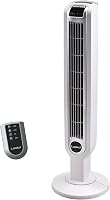
The Lasko T42951 has a remote, 3 speeds, oscillation, a timer, and a nighttime setting. It's a suitable choice for a small or medium room if you want remote controls and a carry handle, but its 3 speeds offer fewer choices than the DREO's 9.
Wipe its base and handle with the same slightly damp cloth. Check the manual before applying any cleaning solution.
What mistakes should you avoid while cleaning?
Never clean a plugged-in fan, spray liquid into its vents, or pry open the housing. These actions can expose electrical parts or damage the fan.
Avoid knives, screwdrivers, cotton swabs, and cloth corners inside the grille. They can scratch surfaces, leave material behind, or push dust farther into the unit.
Skip strong cleaners unless the manual approves them. If the cord is damaged, the fan smells burnt, or it starts making a new noise, stop using it and contact the manufacturer for guidance.
When can you remove a tower fan grille?
Remove a grille only if the manual identifies it as removable and provides cleaning and reassembly steps. Some models allow limited access, while others require service for internal cleaning.
The Levoit has a removable back grille for cleaning. It suits someone who wants an approved way to reach dust behind that grille; follow the Levoit instructions for removal and reinstallation, and don't force it if it resists.
Clean only the parts named in the manual. Confirm the grille is correctly reinstalled and everything is dry before reconnecting power.
If your fan has no approved access point, leave internal dust alone and ask the manufacturer about service. For a different tower fan issue, see why a tower fan may stop oscillating.
Why might a fan still look dusty or move less air?
Dust can remain on an internal surface that you cannot reach from the vents. Repeat gentle cleaning on accessible areas, then consult the manual if airflow still seems reduced.
Check that nearby objects aren't blocking the intake or outlet and that the fan sits on a stable surface. Don't scrape internal parts to remove dust.
For airflow choices by room, read room fans for cooling. If you're deciding what size suits your space, see what size fan you need for your room.
How can you keep a tower fan cleaner between cleanings?
Keep lint and clutter away from the intake, and wipe the exterior when dust begins to collect. A quick look at the vents helps you catch buildup before it becomes harder to remove.
Unplug the fan before moving it. Use the carry handle if the fan has one, and keep loose fabric or other objects from blocking its airflow.
Compare whether tower fans are better than regular fans if you're still choosing a fan style. For nighttime use, see quiet tower fans for sleeping and reading.
Which tower fan is easiest to clean without disassembly?
Choose a fan based on how much access and control you need for care. The Levoit suits buyers who want a removable back grille, the Lasko fits those who want a carry handle and straightforward remote controls, and the DREO fits those who want more speed choices and sleep settings.
For routine cleaning, unplug the fan, vacuum and brush only its outer vents, and wipe the housing with a lightly damp cloth. Use an approved grille only when the manual explains how to remove and reinstall it; for broader airflow options, compare the best oscillating tower fans.
Frequently asked questions
How often should you clean a tower fan?
Clean the exterior and vents when dust is visible or airflow seems reduced, and check the manual for a recommended schedule. A dusty room, pets, and frequent use can mean more frequent cleaning.
Unplug the fan before cleaning, and don't use liquid or tools inside it unless the manual allows them.
Can you clean a tower fan with compressed air?
Only use compressed air if the fan's manual permits it and gives directions. Air can push dust deeper into the housing or spread it around the room, so a vacuum with a brush attachment and a soft brush are easier to control.
Keep the fan unplugged throughout cleaning.
Can you use water to clean a tower fan?
Use a lightly damp cloth on accessible exterior surfaces only, unless the manual gives other instructions. Don't spray water into vents or let liquid reach the motor, controls, or plug.
Dry the exterior before reconnecting the fan, and avoid cleaning products that the manual doesn't approve.
Why is my tower fan still dusty after cleaning?
Dust may remain on the internal fan wheel or behind a grille that isn't meant to come off. Repeat the gentle vacuum and brush steps on accessible vents, then check the manual for deeper cleaning directions.
Stop if access requires prying or removing parts the manual doesn't identify as removable.