8 Best Quiet Tower Fans for Sleeping and Reading (October 2026)
The best quiet tower fans for sleeping and reading include the Honeywell QuietSet HYF290B Tower Fan for simple bedroom controls, the DREO Upgraded DC Tower Fan for sleep mode and speed choice, and the Levoit 36 to 47-inch Adjustable Tower Fan for high beds.
On this page (6 sections)
The best quiet tower fan for most bedrooms is the DREO Upgraded DC Tower Fan, 9 Speeds, with a DC brushless motor, 9 speeds and a sleep mode that dims the display. If a stated noise figure matters most, consider the PELONIS at 22 dB; if your bed sits high, the adjustable Levoit is the more flexible fit.
Quiet is a combination of sound, airflow and nighttime controls. A fan can have a low noise figure but still feel too breezy at your bedside, while a dim display or timer can make a practical difference even when the model has no published decibel number.
Start by deciding where the fan will stand and which part of the room needs airflow. For a broader look at fan types, read our guide to room fans for cooling, and see what size fan you need if you are choosing for a larger space.
Our picks at a glance
-
1
 Best for simple bedroom controls
Honeywell QuietSet HYF290B Tower Fan
8.9/10 our score
See it on Amazon -
2
 Best for sleep mode and speed choice
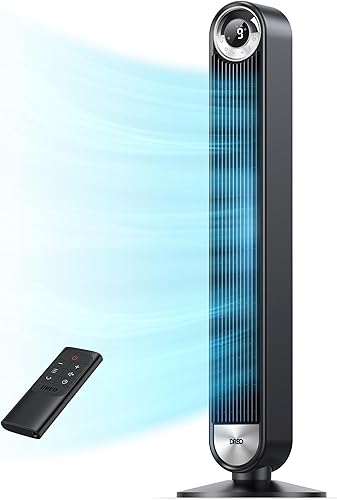
DREO Upgraded DC Tower Fan, 9 Speeds
8.7/10 our score
See it on Amazon -
3

- 4
 Check it
DREO Smart Tower Fan, 40 to 45-inch Adjustable
Best for adjustable smart controls - 5
 Check it
PELONIS 40-inch Bladeless DC Tower Fan
Best for noise-sensitive sleepers - 6
 Check it
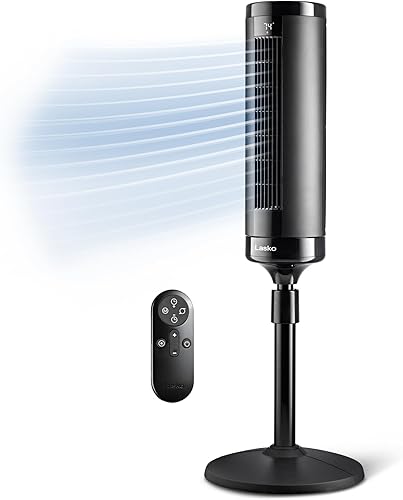
Lasko Elevation DC Tower Fan (EST100)
Best for tall seating areas - 7
 Check it
DREO Smart Tower Fan, 90-Degree Oscillation
Best for app and voice control - 8
 Check it
Honeywell QuietSet HYF295 Tower Fan
Best for dimmable touch controls
Which quiet tower fan is best for your bedroom?
The DREO Upgraded DC Tower Fan is the best quiet tower fan for sleepers who want fine speed control and a mode that dims the display. The other picks solve different needs, including a low stated noise figure, adjustable height, simple bedside controls and app access.
DREO Upgraded DC Tower Fan, 9 Speeds: Best for sleep mode and speed choice
- DC brushless motor
- 9 speeds and 4 modes
- Sleep mode dims the display
- 42 in tall
The DC brushless motor is designed for quiet performance, and sleep mode adjusts airflow and dims the display. Nine speeds give you more adjustment than a basic low, medium and high control.
Pros
- Sleep mode dims the display
- 9 speeds and 4 modes
- Remote and touch controls
Cons
- No numeric noise level
- Fixed height
The DREO Upgraded DC Tower Fan suits people who want more control over airflow at bedtime. Its DC brushless motor is designed for quiet performance, though this model has no numeric noise figure.
Choose among 9 speeds and 4 modes with the built-in controls or remote. Sleep mode adjusts wind speed and dims display lights, making it a good fit if a bright control panel bothers you at night.
At 42 in tall, it is a fixed-height choice. DREO describes it as suitable for large spaces, but a fan's comfort depends on where it sits and how much breeze you prefer.
Choose this model if sleep controls and speed choices matter more than a published decibel number. Skip it if you need adjustable height or want to compare noise by a numeric figure; the Levoit and PELONIS provide stated levels.
For a brand comparison, see our DREO vs Lasko tower fan guide.
Honeywell QuietSet HYF290B Tower Fan: Best for simple bedroom controls
- 8 speed settings
- Remote control stores in the fan housing
- 8-hour auto shut-off timer
- 5 light dimming options
Eight speed settings, an included remote and dimmable lights make it easy to adjust the fan before bed. The remote stores at the back of the housing.
Pros
- 8 speed settings
- Remote stores on the fan
- Timer and light dimming options
Cons
- No stated decibel level
- Timer maxes out at 8 hours
The Honeywell HYF290B is a practical bedroom pick if you want several speed choices and straightforward controls. Its 8 settings range from sleep to power cool, and the remote lets you change the fan from bed.
The remote stores in the back of the housing, so it has a set place when not in use. An 8-hour auto shut-off timer can turn the fan off after you fall asleep, while 5 light dimming options help limit panel glow.
Honeywell describes the model as quiet, but it does not have a stated numeric noise level. Choose it for stored remote convenience and a timer; skip it if comparing a decibel figure is central to your decision.
The 40 in height and 10 x 10 in footprint make it worth considering for a bedroom where floor space is limited. Check the spot beside your bed before buying, especially if furniture narrows the walkway.
Levoit 36 to 47-inch Adjustable Tower Fan: Best for high beds
- Height adjusts from 36 to 47 in
- Noise level as low as 28 dB
- 5 speeds and 4 modes
- Converts to a 24 in fan
Adjustable height helps direct airflow toward a high bed or a lower seating area. The fan can also convert to a 24 in height for low-level airflow.
Pros
- Adjustable height
- Noise level stated as low as 28 dB
- 90-degree oscillation and timer
Cons
- 5 speeds
- Check which height works with your bed and room
The Levoit is the best fit when you need to direct airflow toward a high bed or change the fan height for another spot. It adjusts from 36 to 47 in, and Levoit gives a noise level as low as 28 dB.
Its 5 speeds and 4 modes include Auto mode, which adjusts speed according to room temperature. The remote, 90-degree oscillation and 12-hour timer cover common bedside needs without requiring a phone app.
You can remove the lower section to convert it to a 24 in fan for lower airflow. This makes it useful if the same fan will move between a bedroom and a desk area.
Choose it if height flexibility solves a real placement problem. Skip it if you want more than 5 speeds or do not need height adjustment.
Our Levoit tower fan review covers the adjustable design in more detail.
DREO Smart Tower Fan, 40 to 45-inch Adjustable: Best for adjustable smart controls
- Height adjusts from 40 to 45 in
- 9 speeds and 4 modes
- 25 dB noise level
- App, remote and touch controls
This adjustable model combines a stated 25 dB noise level with sleep mode and 9 speed settings. App, remote and touch controls provide several ways to change airflow.
Pros
- Height adjusts by 5 in
- 9 speeds and 4 modes
- 12-hour timer
Cons
- No sleep mode display detail provided
- App control may be more than you need
The DREO Smart Tower Fan combines adjustable height with app control and a stated noise level of 25 dB. Its 40 to 45 in range can help direct airflow from the bed or a nearby chair.
Sleep mode is one of its 4 modes, and a 12-hour timer can shut the fan off later. You can control it through the app, remote or touch panel, so consider whether app access is useful in your daily routine.
Its height range is narrower than the Levoit's, but it offers 9 speeds and 90-degree oscillation. Choose it if you want several control options along with height adjustment; skip it if a remote is enough and connected features would go unused.
PELONIS 40-inch Bladeless DC Tower Fan: Best for noise-sensitive sleepers
- Noise level stated as low as 22 dB
- 6 speeds and 4 modes
- 90-degree oscillation
- 7-hour timer
PELONIS states a low noise level and includes a sleep mode, 6 speeds and a 7-hour timer. The bladeless design may suit homes where exposed fan blades are a concern.
Pros
- Low stated noise level
- Sleep mode and timer
- Bladeless design
Cons
- 6 speeds
- No adjustable height
The PELONIS is the clearest match if your first filter is a low stated noise figure. PELONIS describes operation as low as 22 dB, and the fan has 6 speeds, 4 modes and a sleep mode.
Its 40 in bladeless design has 90-degree oscillation and a 7-hour timer. The remote lets you change settings from bed, while the timer can switch the fan off after you settle in.
PELONIS describes the airflow as smooth and gives a 1200 CFM figure. The fan has no adjustable height, so measure the space and consider the height of your bed or reading chair before choosing it.
Choose it if the stated noise figure and bladeless design suit your priorities. Skip it if you need to aim airflow at different heights or want more speed choices.
Lasko Elevation DC Tower Fan (EST100): Best for tall seating areas
- Height adjusts from 42 to 54 in
- Noise level as low as 24 dBA
- 8 speeds and 4 modes
- 12-hour timer
The adjustable stand reaches 54 in, which helps aim airflow over a seating area. Lasko states a low-speed noise figure and includes sleep mode.
Pros
- Adjusts up to 54 in
- 8 speeds and 4 modes
- 12-hour timer
Cons
- Larger 14.62 in square base
- No app control
The Lasko Elevation suits a room where the fan needs to sit above a typical tower fan height. Its stand adjusts from 42 to 54 in, and Lasko states a low-speed noise level of 24 dBA.
Eight speeds and 4 modes include sleep and auto settings. The remote controls the fan, while the 12-hour timer lets you set an automatic shutoff without returning to the unit.
The taller setup can help direct airflow over a larger seating area, but its 14.62 in square base needs more floor space than some tower designs. Measure around furniture and check that the base will not narrow a path.
Pick the Elevation if adjustable height matters more than a compact footprint. Skip it if the fan must fit beside a narrow bedside table; a smaller base may be easier to place.
DREO Smart Tower Fan, 90-Degree Oscillation: Best for app and voice control
- 28 dB noise level
- 90-degree oscillation
- App, remote, touch and voice control
- Sleep mode and display auto off
App and voice controls let you adjust the fan without reaching for it, while sleep mode and display auto off suit nighttime use. Its oscillation spreads airflow across more of the room.
Pros
- App and voice control
- Sleep mode and display auto off
- 90-degree oscillation
Cons
- No adjustable height
- No numeric speed count
The DREO Smart Tower Fan suits a bedroom where you want to adjust settings through an app or voice control. It includes sleep mode, display auto off and 90-degree oscillation, with a stated noise level of 28 dB.
A remote and touch controls are available for basic adjustments, so app use is optional. Auto mode adapts fan speed to ambient temperature, and its modes include Normal, Natural, Sleep and Auto.
At 39.76 in tall, it has a fixed height. Choose it if app or voice control is useful at home; skip it if you do not want connected controls or need to change the fan's height.
Honeywell QuietSet HYF295 Tower Fan: Best for dimmable touch controls
- 8 speed settings
- New quieter motor
- Backlit capacitive touch display
- Dimmable sleep mode
The QuietSet design has a touch display, remote and dimmable sleep mode. Eight speed settings offer a range from a quiet setting to stronger airflow.
Pros
- 8 speed settings
- Dimmable sleep mode
- Remote stores on the fan
Cons
- No stated decibel level
- No timer duration
The Honeywell QuietSet HYF295 is for buyers who want touch controls and a dimmable display. Its 8 speed settings range from a quiet setting to higher airflow, and the included remote stores at the back of the fan.
The design has a capacitive touch display and a backlit panel. Sleep mode dims the display, which can reduce light in a dark room, but the fan has no stated numeric noise level.
Its dimensions are 11 x 11 x 39.8 in. The timer duration is not stated, so choose it for the touch interface and light control rather than an automatic shutoff schedule.
Pick the HYF295 if you value a dimmable touch panel. Skip it if a timer or numeric noise figure is a must.
For care tips that apply to tower fans, read how to clean a tower fan without taking it apart.
How should you choose the best quiet tower fan?
Choose by the setting you will use most, then check whether the fan's height, controls and timer support that routine. A quiet low setting is useful only if it still moves enough air for your space.
First, decide where the breeze should go. For a bedside fan, compare its height with the mattress and your preferred airflow direction; for a reading chair, make sure the fan can reach the area without blowing directly at your face.
Next, decide how you want to adjust it. A remote is useful from bed, touch controls suit people who prefer a panel, and an app or voice feature helps only if you plan to use it.
Finally, check the timer and display features. A timer can stop the fan after you fall asleep, while a dimmable or auto-off panel can reduce light in a dark room.
How should you compare noise figures on quiet tower fans?
Use noise figures as a shortlist tool, then compare what each model says about the speed or mode behind the number. The PELONIS states 22 dB, the adjustable DREO 25 dB, the Levoit as low as 28 dB and the Lasko 24 dBA at low speed.
The figures use different units and conditions, so they are not a direct ranking of how each fan will sound in your room. Honeywell describes quiet settings but provides no numeric figure; the DREO Upgraded DC model is designed for quiet operation without a specific level.
Pay attention to whether the number is tied to a particular speed. Lower airflow may be quieter but may also feel too gentle for a large room or for a person who wants a strong breeze.
Does a sleep mode help when you read or sleep?
A sleep mode is useful when it changes something you would otherwise adjust yourself, such as speed or display brightness. The DREO Upgraded DC mode adjusts wind speed and dims its display; the PELONIS includes a sleep mode and 7-hour timer.
The Honeywell HYF290B offers 5 light dimming options and an 8-hour auto shut-off timer. The HYF295 dims its panel in sleep mode, while the app-connected DREO turns its display off automatically.
Check whether you want a fan that runs all night, turns off after a set time, or adjusts speed as room temperature changes. Those are separate features, even when they appear under labels such as sleep or auto.
Should you choose an adjustable tower fan?
Choose an adjustable fan if your bed or chair height makes airflow direction difficult. The Levoit adjusts from 36 to 47 in and converts to 24 in, the adjustable DREO ranges from 40 to 45 in, and the Lasko reaches 54 in.
A fixed-height model is a sensible choice if you already know where it will stand and the airflow reaches you from that position. Measure from the floor to the target area, then account for the base and nearby furniture.
For a high bed, the Levoit offers the broadest stated height range among these choices. For taller seating or a higher airflow path, the Lasko extends farther, though its base needs more room.
Is oscillation useful for quiet reading?
Oscillation is useful when you want the breeze to move across a wider area instead of staying in one direction. It can suit a shared room, but a fixed breeze may be more comfortable for someone reading in one chair.
Several picks offer 90-degree oscillation, including the Levoit, adjustable DREO models and PELONIS. Check whether the model lets you turn the sweep off so airflow can stay pointed at a single spot.
How do you set up a tower fan for quiet use?
Set the fan on a level, stable floor with space around its air intake and outlet. Keep it clear of curtains, bedding and furniture, and route the cord away from walkways.
Put the fan where the breeze can reach your body without blowing directly at your face all night. If you want air to spread through a room, aim it across the space and use oscillation; for a fixed reading spot, point it at the chair and leave oscillation off if possible.
Start at the lowest speed that feels comfortable, then move up one step at a time. This helps you find a useful balance between airflow and sound instead of starting at a stronger setting than you need.
Before bed, set the display, mode and timer in the order you prefer. Keep the remote in its storage spot when the model has one, or place it somewhere easy to reach so you do not need to turn on room lights to adjust the fan.
What care keeps a tower fan running smoothly?
Keep dust from building up around the intake and exterior surfaces, and follow the care instructions for the specific model. Turn the fan off and unplug it before cleaning.
Use a dry or lightly damp cloth on accessible surfaces as directed by the manual, and avoid letting moisture enter the control panel or openings. Do not force the housing apart unless the manufacturer gives instructions for doing so.
If the airflow changes or you hear an unusual rattle, switch the fan off and check for a blocked intake, loose debris or an unstable surface. Our tower fan cleaning guide explains how to clean accessible areas without taking the unit apart.
What mistakes should you avoid when buying a quiet tower fan?
Do not compare decibel figures as if every brand used the same conditions. Check whether the number refers to a particular speed, and remember that fan distance, room sound and airflow direction affect how it feels at night.
Do not pick a fan only because it has the lowest stated noise figure. A quiet setting may not move enough air for your room, and a fan with more speeds or a sleep mode may be easier to tune to your needs.
Do not assume oscillation or adjustable height is always better. Those features add value when you need a wider sweep or a different airflow level, but a fixed fan can be simpler if its placement is already clear.
Do not overlook the base and cord when planning placement. Measure the floor area near the bed or chair, keep walking paths clear and make sure an outlet is close enough for the cord to reach without crossing a route through the room.
Which best quiet tower fan should you choose?
Choose the DREO Upgraded DC Tower Fan, 9 Speeds for a flexible sleep mode and fine speed control. Pick the Honeywell HYF290B for straightforward bedside controls and a timer, the PELONIS for its low stated noise figure, or the Levoit if airflow needs to reach a high bed.
For app access and adjustable height together, consider the DREO Smart Tower Fan, 40 to 45-inch Adjustable. If the fan must reach taller seating, the Lasko Elevation extends higher; compare its footprint with your available floor space before deciding.
For more airflow coverage options, read our guide to oscillating tower fans. Choose the model whose height, controls and lowest comfortable speed fit the room where you will use it.
Our top 3 picks at a glance
-
1
Best for simple bedroom controls
Honeywell QuietSet HYF290B Tower Fan
8.9/10 our score
See it on Amazon -
2
Best for sleep mode and speed choice
DREO Upgraded DC Tower Fan, 9 Speeds
8.7/10 our score
See it on Amazon -
3
Frequently asked questions
What makes a tower fan quiet enough for sleeping?
Start with the lowest speed you expect to use, then compare any stated noise figure for that setting. A sleep mode, dimmable display and timer can also help reduce nighttime distractions.
The models here vary in which of these details they provide, so match the controls to your routine.
Is a DC tower fan quieter than an AC tower fan?
A DC motor alone doesn't tell you how quiet a fan will be. Compare stated noise figures and sleep features for the exact model, since designs and published noise details vary.
Room sound, distance from the fan and selected speed also affect what you hear at night.
Does oscillation make a tower fan louder?
Oscillation moves airflow across a wider area, but it doesn't determine how loud a fan will be. Noise depends on the model and speed.
If a moving breeze distracts you, switch oscillation off when that option is available and aim the fan in one direction.
Where should you place a tower fan for sleeping?
Place the fan on a level surface where air can move freely, and keep its cord clear of walkways. Aim the breeze across the room or toward your body without directing strong air at your face all night.
For more placement ideas, see our fan direction guide.